How to git
This page describes our workflow and agreements on how to work with our version control tools.
Code owners
Every repository must have a file specifying which team is the owner of the code. The code owners are responsible for
the parts in the repository which are specified in the CODEOWNERS file. This is later on used to approve pull requests.
The development department has one parent team called Development, which is split in two child teams;
backend and frontend. These teams can be used in the CODEOWNERS file to assign ownership and responsibility.
Branching strategy
UTURN uses the Feature Branch strategy as this allows us to iterate fast and reduces branching complexity. The longer a branch lives, the more complex a merge becomes, hence, the goal is to keep branches alive a short as possible and should only exist for as long as the feature is in development.
Besides increasing the iteration time, we spend less resources at managing test, staging environments, and unclear merge
processes. The latest and most up-to-date code always and only lives in the main branch. This is also the only protected
and only root branch.
Developers can create branches only in the following branch folders. It is not possible to create branches outside these folders.
- feature
- bugfix
- hotfix
- poc
Naming conventions
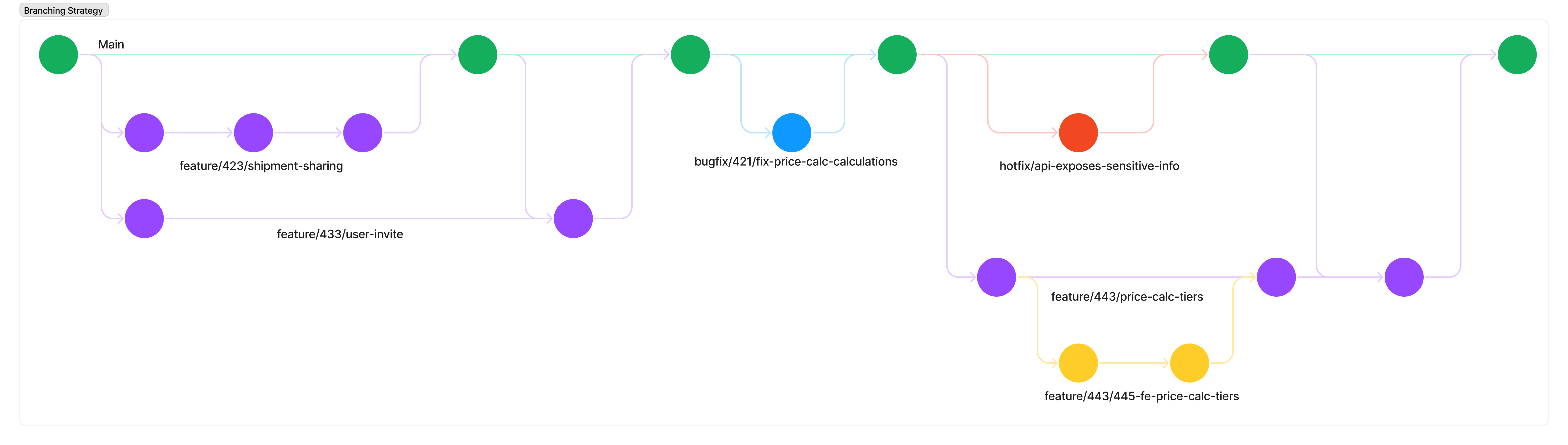
Besides only allowing certain branch folders, we also have guidelines in place which must be followed when creating a new branch. See the figure below for an example of the strategy following this naming conventions.
Feature branches
Feature branch naming follows the following convention: feature/{TICKET_NUMBER}/{SHORT_DESCRIPTION}
Since it is possible multiple developers work on the same feature, e.g. FE and BE, it is allowed to further split those
branches. That would look like feature/{TICKET_NUMBER}/{SUBTASK_TICKET_NUMER}-{SHORT_DESCRIPTION}
Bugfix branches
The naming of a bug fix branch is similar to the feature branches. bugfix/{TICKET_NUMBER}/{SHORT_DESCRIPTION}
Hotfix branches
Since hotfix branches don’t have tickets the convention is to just write a description: hotfix/{SHORT_DESCRIPTION}
POC branches
POC branches might not have tickets so the convention is to just write a description: poc/{SHORT_DESCRIPTION}. In case
there is a related ticket, please follow the same guidelines as the Feature branches.
Commit messages
Commit messages are written using the Conventional Commits specification. Check the specification for a deeper understanding and examples. Generally a commit message is structured as follows:
<type>[optional scope]: <description>

[optional body]

[optional footer(s)]
Type types we use within UTURN are:
- fix
- feat
- build
- chore
- ci
- docs
- style
- refactor
- perf
- test
- revert
Types are always written in lowercase and when a breaking change applies, it is noted by added a ! directly after
the type and it is required to include the BREAKING CHANGE: write what is breaking here in the footer.
Both Visual Studio Code, and IntelliJ, have plugins available to help write Conventional Commits.
Pull requests
In almost all cases it is required to create a PR before you merge your code to main. A PR is created when you are
finalised your work and are ready to receive feedback from the code owners of that (part of the) repository.
Repositories must be setup in such a way that when a PR is created, a member of the specified code owners team is automatically assigned. You should review your code before creating a PR!
PR rules
- You must review a PR before 12:00am the next working day after you get assigned.
- A PR cannot be merged if it has failed jobs.
- A PR cannot be merged without review.
- You cannot review your own PR.
- All comments must be
resolvedbefore you merge a PR. - A PR should not be rejected more than once. If it's rejected a second time, you remove the PR and evaluate your own code first.
- PR comments must be constructive and helpful.
- If applicable, fill in the PR template before creating the PR.